How to Create the Perfect Favicon: Format and Size Guide
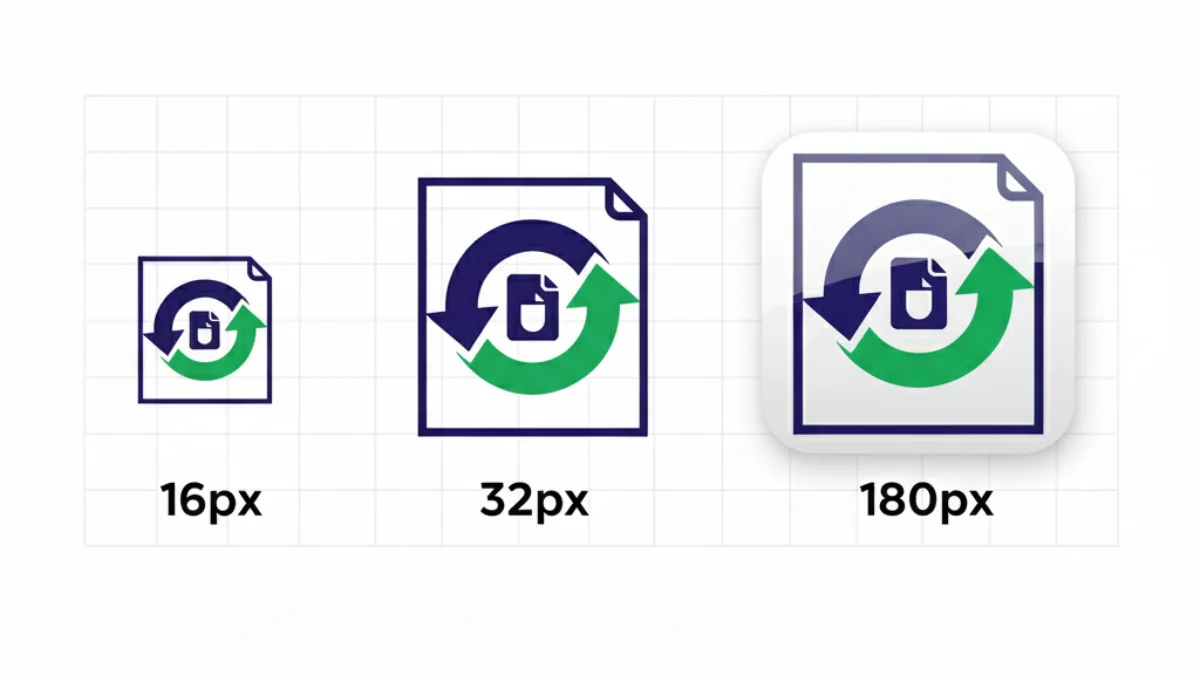
The favicon is perhaps the smallest branding element on your website, but its importance is huge. It's that little icon that lives in the browser tab, user bookmarks and, increasingly, in Google mobile search results.
A good favicon conveys professionalism and helps users locate your site among dozens of open tabs. However, many designers make the mistake of simply shrinking their main logo, resulting in a blurry, unrecognizable blob.
According to data from Evil Martians and Mozilla Developer Network, the modern minimum favicon set has drastically reduced: from over 20 PNG files to just 3-5 strategic files. This guide shows you how to create a perfectly optimized favicon that works across all browsers and devices without wasting resources.
The art of designing for tiny sizes
The golden rule: Extreme simplification
You can't fit a complex logo into 16 square pixels. If your logo has text and a symbol, keep only the symbol. If it's just text, use the initial.
Favicon design principles
1. High contrast
The favicon must be readable on light AND dark backgrounds. Modern browsers support prefers-color-scheme, allowing dynamic light/dark versions.
2. Solid shapes
Fine details (1px lines, smooth gradients) will be lost when reducing to 16x16. Bet on simple geometric shapes and flat colors.
3. Full canvas usage
Take advantage of all available space. Favicons are square, so circular designs or excessive margins will waste valuable pixels.
4. Test in real context
Always design looking at the final result in a real browser. What works in Figma at 500% zoom may fail in the browser tab.
ICO vs PNG vs SVG: The format battle
ICO format: The immortal veteran
According to MDN and Evil Martians, the .ico format remains mandatory for compatibility reasons:
ICO advantages:
- Container structure: A single .ico file can contain multiple resolutions (16x16, 32x32, 48x48)
- Universal compatibility: Works in IE11, old browsers, RSS tools
- Location requirement: Must be at
https://example.com/favicon.ico(domain root)
Why it's still necessary:
Many tools (RSS readers, aggregators, bots) simply do GET /favicon.ico without parsing HTML. If it doesn't exist, your site appears without an icon.
SVG format: The scalable future
Supported by 72% of browsers according to Can I Use:
SVG advantages:
- Infinite scalability: Looks perfect at any resolution (16px to 512px)
- Minimum weight: Simple logos weigh 1-3 KB vs 15-30 KB PNG
- Light/dark mode: Supports
@media (prefers-color-scheme: dark)with inline CSS
SVG example with dark mode:
<svg xmlns="http://www.w3.org/2000/svg" viewBox="0 0 500 500">
  <style>
    @media (prefers-color-scheme: dark) {
      .logo { fill: #f0f0f0 }
    }
  </style>
  <path class="logo" fill="#0f0f0f" d="..."/>
</svg>
Limitation: Safari iOS <16.4, IE11, old browsers don't support <link rel="icon" type="image/svg+xml">.
PNG format: The solid standard
Necessary for mobile devices and PWAs:
PNG advantages:
- Total compatibility: 100% browsers
- Alpha transparency: Transparent backgrounds to adapt to themes
- Aggressive optimization: With Squoosh/OxiPNG you can reduce 70% weight without visual loss
When to use PNG:
- Apple Touch Icon (180x180)
- Android PWA icons (192x192, 512x512)
- Maskable icons (512x512 with special padding)
Essential sizes you cannot miss
According to MDN Progressive Web Apps documentation and web.dev:
Essential minimum set (3-5 files)
| File | Size | Format | Use | Required |
|---|---|---|---|---|
| favicon.ico | 32x32 (16x16 optional) | ICO | Legacy browsers, RSS, domain root | ✅ YES |
| icon.svg | Vector | SVG | Modern browsers (Chrome, Firefox, Edge) | ✅ YES |
| apple-touch-icon.png | 180x180 | PNG | iOS Safari, iPad, Apple bookmarks | ✅ YES |
| icon-192.png | 192x192 | PNG | Android home screen, PWA | PWA only |
| icon-512.png | 512x512 | PNG | Android splash screen, PWA | PWA only |
Breakdown by platform
Windows 10/11:
- Taskbar: 44x44
- Start Menu: 150x150
- Edge PWA: 512x512
macOS:
- Touch Bar: 128x128
- Dock: 256x256, 512x512 (Retina)
iOS (iPhone/iPad):
- Home screen: 180x180 (since iOS 8+)
- Spotlight search: 120x120
- Settings: 58x58
Android:
- Chrome PWA: 192x192, 512x512
- Adaptive icons: 108x108 (maskable area)
Automatic and error-free generation: The perfect workflow
Step 1: Design the master version
- Resolution: 512x512 px minimum (allows downscaling without quality loss)
- Artboard: Perfect square with 0px margins
- Format: PNG 24-bit with alpha transparency or SVG
- Color: Solid colors (no gradients or blurs)
Step 2: Generate all sizes
Use automated tools. Manual generation = guaranteed human errors.
Recommended tools:
- RealFaviconGenerator.net: Most complete generator with PWA, iOS, Android support
- FormatVault: Local processing (privacy), batch, multiple formats
- Squoosh.app: Google tool for manual optimization and format comparison
Step 3: Validate
- Test on Chrome, Firefox, Safari, Edge
- Check appearance in dark mode
- Verify weight (total set <100 KB)
- Test on real mobile (not just DevTools)
HTML code to include
<head>
  <!-- ICO for legacy compatibility -->
  <link rel="icon" href="/favicon.ico" sizes="32x32">

  <!-- SVG for modern browsers -->
  <link rel="icon" href="/icon.svg" type="image/svg+xml">

  <!-- PNG for iOS -->
  <link rel="apple-touch-icon" href="/apple-touch-icon.png">

  <!-- PWA manifest (if applicable) -->
  <link rel="manifest" href="/manifest.webmanifest">
</head>
manifest.webmanifest (PWA only):
{
  "name": "App Name",
  "short_name": "App",
  "icons": [
    {
      "src": "/icon-192.png",
      "sizes": "192x192",
      "type": "image/png"
    },
    {
      "src": "/icon-512.png",
      "sizes": "512x512",
      "type": "image/png"
    },
    {
      "src": "/icon-512-maskable.png",
      "sizes": "512x512",
      "type": "image/png",
      "purpose": "maskable"
    }
  ]
}
Common mistakes and how to avoid them
❌ Error 1: Using transparent PNGs without padding for Apple Touch Icon
Problem: iOS adds black background to transparent icons.
Solution: Add 10% internal padding and solid background color:
<!-- ❌ INCORRECT -->
<link rel="apple-touch-icon" href="/logo.png">

<!-- ✅ CORRECT -->
<link rel="apple-touch-icon" href="/apple-touch-icon-180.png">
The 180x180 file should have 18px internal margin and solid color background.
❌ Error 2: Not specifying sizes attribute
Problem: Browser doesn't know which icon to use when.
Solution:
<!-- ❌ INCORRECT -->
<link rel="icon" href="/icon-32.png">
<link rel="icon" href="/icon-192.png">

<!-- ✅ CORRECT -->
<link rel="icon" href="/icon-32.png" sizes="32x32">
<link rel="icon" href="/icon-192.png" sizes="192x192">
❌ Error 3: Forgetting maskable icons for Android
Problem: Android adaptive icons crop circular area, cutting off logo corners.
Solution: Generate 512x512 PNG with 20% safe zone (content in central 60%):
Test with maskable.app before deploying.
❌ Error 4: Inconsistent colors across formats
Problem: ICO dark, SVG light, PNG different → looks unprofessional.
Solution: Use same color palette in all formats. If using dark mode, ensure both versions match:
/* SVG with light/dark mode */
<style>
  .icon { fill: #000 }
  @media (prefers-color-scheme: dark) {
    .icon { fill: #fff }
  }
</style>
Bonus tip: Different icons for staging and production
Save hours of confusion on multi-environment teams. Add a visual indicator to distinguish development/staging from production:
Practical examples:
- Production: Blue icon
- Staging: Yellow icon (warning color)
- Local dev: Red icon (high visibility)
Automatic implementation:
<!-- React/Vite example -->
{import.meta.env.MODE === 'production'
  ? <link rel="icon" href="/favicon-prod.ico" />
  : <link rel="icon" href="/favicon-dev.ico" />
}
Recommended automated tools
1. RealFaviconGenerator
- URL: https://realfavicongenerator.net
- Features: Automatic generation of all sizes, HTML code, manifest.json
- Advantage: Platform-specific previews (iOS, Android, Windows)
- Use: Upload 260x260 px or larger master
2. FormatVault (local processing)
- URL: FormatVault
- Features: 100% local processing (privacy), batch, multiple formats
- Advantage: No data upload, works offline, open source
- Use: Drag PNG/SVG, select sizes, download ZIP
3. favicon.io
- URL: https://favicon.io
- Features: Generate favicon from text, emoji or image
- Advantage: Ultra-fast for simple designs (text initials)
- Use: Enter text, select font, download
4. Squoosh (manual optimization)
- URL: https://squoosh.app
- Features: Image compression with visual comparison, format conversion
- Advantage: Manual control of quality/size trade-off
- Use: Upload PNG, adjust quality, download WebP/AVIF/PNG
Obsolete formats you NO longer need
❌ browserconfig.xml (Microsoft)
Before: Required for Windows 8/10 Metro tiles.
Now: Windows 11 and Edge use Web App Manifest. Even microsoft.com removed browserconfig.xml.
❌ mask-icon (Safari)
Before: Safari 9-11 required <link rel="mask-icon" color="#000"> for monochrome pinned tab icon.
Now: Safari 12+ uses standard favicon. Even apple.com no longer uses <link rel="mask-icon">.
❌ 30+ PNG sizes
Before: Old generators created 192x192, 384x384, 256x256, 128x128, 96x96, 72x72, 64x64, 48x48, 32x32, 24x24, 16x16...
Now: Browsers scale automatically. With 3 PNGs (180, 192, 512) + SVG you cover 100% of real cases.
FAQ: Technical questions
Q: Should I include favicon on every HTML page or just index?
A: Include favicon <link> tags on all pages. If a user bookmarks an internal URL, the browser must know where the favicon is.
Q: Can I use only SVG and forget ICO/PNG?
A: No. Safari iOS <16, IE11, RSS readers and legacy tools don't support SVG. The ICO at /favicon.ico is mandatory.
Q: My favicon doesn't update after changing it, what do I do?
A: Browsers cache favicons aggressively. Solutions:
- Development: Ctrl+F5 to reload without cache
- Production: Add cache buster to filename:
icon.svg?v=2 - PWA Manifest: Change version in
manifest.webmanifest
Q: Does favicon affect SEO?
A: Indirectly yes. Google shows favicons in mobile results since 2019. A professional favicon improves CTR (Click Through Rate).
Q: What's the maximum recommended weight for a favicon?
A: ICO: <15 KB | SVG: <5 KB | PNG (180-512): <30 KB each. Total set: <100 KB. For advanced techniques to reduce weight without losing quality, check our specialized guide.
Conclusion: The perfect favicon
The functional minimum set:
- ✅ favicon.ico (32x32) at domain root
- ✅ icon.svg with light/dark mode support
- ✅ apple-touch-icon.png (180x180 with padding)
- ✅ manifest.webmanifest with 192px and 512px icons (PWA only)
Design that works:
- Extreme simplicity (symbol or initial only)
- High contrast on light and dark backgrounds
- Solid shapes without fine details
- Test in real browser at 16x16
Your next step:
Use FormatVault to generate your complete favicon set in 30 seconds with 100% local processing. Upload your logo, download the ZIP with all optimized files and HTML code ready to copy. A small detail that makes a big professional difference.
Official sources:
- developer.mozilla.org/en-US/docs/Web/Progressive_web_apps/How_to/Define_app_icons (MDN)
- evilmartians.com/chronicles/how-to-favicon-in-2021-six-files-that-fit-most-needs
- web.dev/articles/add-manifest (Google)
- maskable.app (official maskable icons tool)
Was this article helpful?
Share it and help more people optimize their images
Related Articles
Ultimate Guide to Optimize Images for SEO
Learn to optimize images for SEO step by step with professional techniques.
WebP vs AVIF vs JPEG: Complete Technical Format Analysis
Definitive technical comparison with official Google data.
Reduce Image Size 80% Without Losing Quality
A 500KB image can become 100KB with no visible difference.